

A Korean PC bang is more than an internet café. It combines high-performance gaming computers, fast internet, seat-side food ordering, and a social space that many locals use with friends.
Foreign travelers can usually use a PC bang as non-members, but Korean-only kiosks, regional game accounts, and unfamiliar payment systems can make the first visit confusing.
This guide explains how to find a PC bang, buy usage time, log in, choose a game, order food, and leave safely.
Last checked: August 5, 2026
Prices, payment methods, menus, game availability, age restrictions, and operating hours can vary by location. Check the latest information at the venue before paying.
| Item | What to expect |
|---|---|
| Tourist access | Usually available as a non-member |
| Typical cost | About ₩3,000–₩7,000 for 1–2 hours |
| Korean phone number | Usually not needed for non-member access |
| Reservation | Usually unnecessary for standard seats |
| Food | Often ordered directly from the PC |
| Recommended visit | About 1–2 hours for a first experience |
Quick Navigation
- 🖥️ What Does “PC Bang” Mean?
- 📍 How to Find a PC Bang in Korea
- 💳 How Much Does a Korean PC Bang Cost?
- 🧾 Step 1: Choose Member or Non-Member Access
- 💰 Step 2: Purchase Your PC Time
- 🪑 Step 3: Choose an Available Seat
- 🔑 Step 4: Log In to the PC
- 🕹️ Step 5: Choose a Game
- 🍜 Step 6: Order Food from Your Seat
- 🍽️ What Should You Eat at a PC Bang?
- 🌶️ Food Allergies and Dietary Restrictions
- 🎧 PC Bang Etiquette: How to Behave Like a Local
- ⏳ How to Add More Time
- 🚪 How to Finish and Log Out Safely
- 👨👩👧 Can Children and Teenagers Use a PC Bang?
- 🌙 Can Adults Stay at a PC Bang Overnight?
- ⭐ Two Traveler-Friendly Gaming Venues in Seoul
🖥️ What Does “PC Bang” Mean?
The Korean word bang, written as 방, means “room.”
A PC bang, written as PC방, can therefore be understood as a “PC room.” In English, it is often described as an internet café or gaming café.
However, a Korean PC bang is usually different from a basic internet café used only for printing documents or checking email.
Many locations focus on gaming and provide:
- High-performance desktop computers
- Gaming monitors
- Large desks
- Comfortable chairs
- Headsets
- Gaming keyboards and mice
- Popular game clients
- Food and beverage menus
- Fast internet connections
- Group or premium seating at selected locations
PC bangs can be found throughout Korean cities and towns. Seoul’s official living guide notes that they are widely available in major cities and towns across the country.
📍 How to Find a PC Bang in Korea
The easiest way to find one is to search in NAVER Map.
Use either:
PC방or:
피시방You can also search:
24시간 PC방which means “24-hour PC bang.”
Read recent reviews and look at photos before visiting. Two PC bangs in the same neighborhood may have very different computers, cleanliness, menus, and seating.
Check for:
- Recent interior photos
- Monitor and computer specifications
- Non-smoking environment
- Food menu photos
- Guest or non-member access
- English instructions
- Operating hours
- Reviews mentioning foreigners
- Seating availability
- Card payment options
Travelers who have not installed NAVER Map can read [5 Essential Apps You Must Download Before Traveling to South Korea].
Official download links are available in [Where to Download 5 Essential Apps for Traveling in South Korea].
💡 Local Tip: Avoid Choosing Only by Distance
The closest PC bang is not always the easiest one for a tourist.
A small neighborhood location may be inexpensive but have:
- Korean-only kiosks
- Older equipment
- Limited staff assistance
- Membership-focused pricing
- Fewer foreign payment options
A larger branded or premium PC bang in a busy area may cost more, but it can be easier for a first visit.
💳 How Much Does a Korean PC Bang Cost?
PC bang pricing varies by:
- Neighborhood
- Computer specifications
- Membership status
- Time package
- Seat category
- Day and time
- Premium or private room use
Some locations charge by the hour, while others sell prepaid time packages.
Members may receive more time for the same payment than non-members. At T1 Base Camp, for example, VISITKOREA previously listed separate member and non-member hourly pricing, showing how branded venues may charge visitors differently depending on account type. That page also advises visitors to confirm current information before visiting.
For basic trip planning, allow approximately:
| Expense | Suggested budget |
|---|---|
| One to two hours of PC time | ₩3,000–₩7,000 |
| Drink or snack | ₩2,000–₩5,000 |
| Simple meal | ₩4,000–₩10,000 |
| Estimated total | About ₩10,000–₩20,000 |
These figures are planning estimates, not fixed prices. Premium gaming centers, private rooms, and branded esports venues may cost more.
🧾 Step 1: Choose Member or Non-Member Access
When you enter, look for:
- A payment kiosk
- A counter
- A sign showing available seats
- A screen with
회원and비회원
The two important Korean words are:
| Korean | English |
|---|---|
| 회원 | Member |
| 비회원 | Non-member |
| 게스트 | Guest |
| 이용시간 | Usage time |
| 결제 | Payment |
| 좌석 | Seat |
| 영수증 | Receipt |
Short-term visitors will usually want 비회원, meaning non-member.
At some venues, membership requires a Korean registration card, domestic phone number, or local identity verification. Gen.G GGX, for example, states that visitors without a Korean ID or phone number can use its PCs as non-members by purchasing time at the kiosk.
Membership requirements are not identical everywhere, so choose the guest option unless staff specifically recommends another method.

💰 Step 2: Purchase Your PC Time
The exact screen differs by location, but the process commonly follows this order:
- Select Non-member or Guest.
- Choose how much time you want.
- Confirm the price.
- Select a payment method.
- Complete payment.
- Take the printed receipt or note the login code.
- Check whether a seat number was assigned.
Payment options may include:
- Korean credit or debit card
- Foreign-issued card
- Cash
- Mobile payment
- Payment at the counter
Foreign cards do not work at every unattended kiosk.
Bring:
- More than one payment card
- Some Korean won
- Your passport or a copy of your identification
- Papago for translation
Do not buy a large time package on your first visit. Start with one hour and add more time after confirming that the login, game, and equipment work properly.
When the Kiosk Does Not Accept Your Card
Try the following:
- Look for a cash option.
- Try another card.
- Ask the counter staff.
- Show the Korean sentence below.
비회원으로 이용하고 싶어요. 결제를 도와주실 수 있나요?
Meaning:
I would like to use the PC as a non-member. Could you help me with payment?
🪑 Step 3: Choose an Available Seat
Some PC bangs assign a seat during payment.
Others allow you to choose any empty computer after purchasing time.
Look for:
- A dark or inactive monitor
- An empty chair
- No belongings on the desk
- A seat marked as available on the kiosk
- A specific gaming zone matching your ticket
Do not sit at a computer if someone has left a bag, jacket, drink, headset, or other belongings there. They may still be using that seat.
Premium PC bangs may divide seats into categories such as:
- Standard seats
- High-spec seats
- Curved-monitor seats
- Couple seats
- Private rooms
- Team rooms
- Console areas
Confirm that your purchased time applies to the seat category you choose.
🔑 Step 4: Log In to the PC
At a tourist-friendly PC bang, a non-member receipt may include:
- A guest number
- A temporary username
- A temporary password
- A barcode
- A seat number
At GGX, non-members purchase time at the kiosk, select an available seat, and enter the code printed on the receipt. This is one example of a straightforward tourist-friendly login system, although other PC bangs may operate differently.
The monitor may display fields such as:
| Korean | Meaning |
|---|---|
| 아이디 | ID or username |
| 비밀번호 | Password |
| 로그인 | Log in |
| 비회원 로그인 | Non-member login |
| 자리이동 | Change seat |
| 시간충전 | Add more time |
| 로그아웃 | Log out |
Do not photograph or share your temporary login code while it is still active.

🕹️ Step 5: Choose a Game
Many PC bangs have launchers or shortcuts for popular games.
Possible categories include:
- League of Legends
- Valorant
- Overwatch
- PUBG
- FC Online
- Lost Ark
- MapleStory
- Dungeon Fighter Online
- Steam games
- Other online multiplayer titles
The available games depend on the venue.
Important: PC Access Does Not Include a Game Account
Paying for a PC gives you access to the computer, not automatic access to every game.
You may still need:
- Your own game account
- A compatible regional account
- Email verification
- Two-factor authentication
- A game purchase
- Age verification
- A Korean account for certain titles
Some Korean games require local identity verification or a Korean account. Therefore, a short-term visitor may not be able to play every locally installed game.
Before your trip:
- Decide which game you want to play.
- Check whether your account works in Korea.
- Confirm the game’s regional login rules.
- Set up two-factor authentication.
- Make sure you can receive verification emails or messages.
- Remember your password.
- Avoid saving login information on the shared computer.
Steam Users
Log in with your own Steam account and check whether the title is already installed.
Downloading a large game can take time, even with fast internet. The PC may also reset or remove files after you log out.
Never select “Remember me” on a public computer.
🍜 Step 6: Order Food from Your Seat
Eating is a major part of the Korean PC bang experience.
At many modern locations, you do not need to leave your computer. Look for a button or tab on the desktop that may say:
- 먹거리
- 음식 주문
- 먹거리 주문
- 메뉴
- Order Food
At GGX, visitors can place food orders through an “Order Food” tab on the PC. Its official FAQ lists card, KakaoPay, and cash as available payment methods for food, although payment choices at other PC bangs may differ.
The usual process is:
- Open the food-ordering menu.
- Select a category.
- Choose an item.
- Add optional toppings.
- Confirm your seat number.
- Select payment.
- Submit the order.
- Wait for staff to deliver it.
Some venues require food payment at the kiosk or counter rather than on the computer.
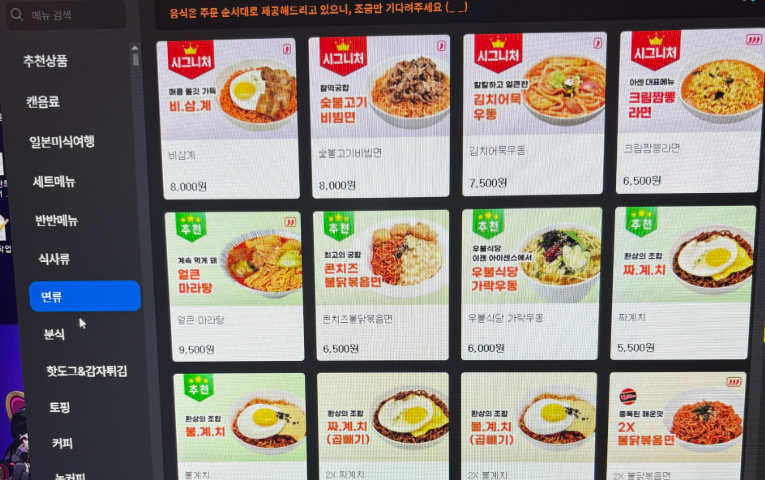
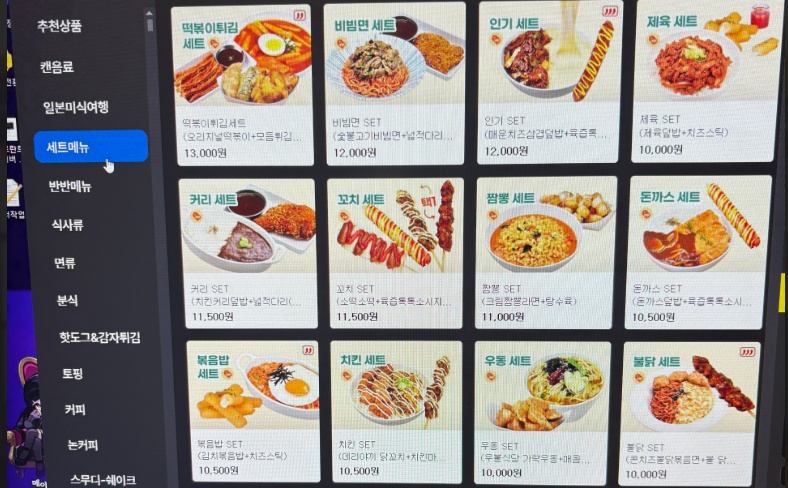

🍽️ What Should You Eat at a PC Bang?
Menus vary from a few snacks to full restaurant-style selections.
Korea’s official tourism content notes that some PC bangs serve everything from basic snacks and drinks to fried chicken and more substantial Korean dishes.
Common menu categories may include:
Ramyeon
Korean instant noodles are one of the most recognizable PC bang foods.
Possible additions include:
- Egg
- Cheese
- Green onion
- Rice cake
- Dumplings
- Sausage
Rice Dishes
Popular options may include:
- Kimchi fried rice
- Chicken mayonnaise rice
- Spam and egg rice
- Bulgogi rice
- Curry rice
- Jajang rice
Tteokbokki and Street Food
Some locations offer:
- Spicy rice cakes
- Fried dumplings
- Fish cake
- Sausage and rice cake skewers
- Hot dogs
Fried Snacks
Look for:
- French fries
- Chicken
- Cheese sticks
- Onion rings
- Fried dumplings
- Nuggets
Drinks
Options often include:
- Cola
- Iced tea
- Coffee
- Energy drinks
- Smoothies
- Fruit drinks
- Bottled water
T1 Base Camp has previously offered player-themed choices such as T1 ramyeon, chicken mayonnaise rice, and smoothies, illustrating how PC bang food can also become part of an esports fan experience.

🌶️ Food Allergies and Dietary Restrictions
Do not assume that an English menu lists every ingredient.
PC bang kitchens may use shared:
- Fryers
- Cooking utensils
- Grills
- Sauces
- Preparation surfaces
If you have a serious allergy, show staff a clearly written Korean allergy card before ordering.
Papago can help with basic questions, but automatic translation cannot guarantee that food is safe.
Useful sentences include:
Does this contain peanuts?
Is there pork in this dish?
Is this spicy?
Is this vegetarian?
Is the fryer shared with other foods?
Travelers who need translation support can use Travelers who need translation support can learn more in 5 Essential Apps You Must Download Before Traveling to South Korea.
🎧 PC Bang Etiquette: How to Behave Like a Local
PC bangs can be lively, but basic consideration still matters.
Keep Your Voice Under Control
Players may react loudly during games, but prolonged shouting or screaming can disturb the entire room.
Use a normal speaking voice when talking to friends.
Use Headphones
Do not play music, videos, or game audio through the external speakers unless the venue specifically allows it.
Do Not Touch Another Person’s Equipment
Do not move:
- Someone else’s mouse
- Keyboard
- Chair
- Headset
- Drink
- Bag
- Phone
Even an apparently empty seat may still be active.
Clean Up Spills Immediately
Food and drinks are served beside expensive equipment.
If you spill something:
- Stop using the keyboard or mouse.
- Move the drink away.
- Call a staff member immediately.
- Do not attempt to hide the spill.
Avoid Filming Other Customers
You can photograph your own screen, food, and seat, but avoid recording strangers’ faces or game screens without permission.
Check the Outside Food Policy
Some PC bangs allow outside drinks, while others prohibit all outside food and beverages.
GGX, for example, asks visitors not to bring in outside food or drinks.
Follow the policy of the specific venue.
Protect Your Belongings
Do not leave your:
- Passport
- Wallet
- Phone
- Camera
- Shopping bags
- Travel documents
unattended when going to the restroom or counter.
⏳ How to Add More Time
Your remaining time is usually displayed somewhere on the screen.
Look for words such as:
남은 시간Meaning:
Remaining time
When your session is nearly finished, the computer may show a warning.
To continue, you may need to:
- Select “Add Time” on the desktop
- Return to the kiosk
- Enter your guest code
- Pay at the counter
- Purchase a new receipt
Do not wait until the final second if you are in the middle of an online match.
At some locations, unused non-member time may not be saved after you log out. Check the local policy before leaving your seat.
🚪 How to Finish and Log Out Safely
Before leaving:
- Close your game.
- Log out of the game launcher.
- Log out of Steam or other platforms.
- Close your email.
- Remove saved passwords.
- Check the browser download folder.
- Log out of the PC bang system.
- Check the desk and floor for belongings.
- Return borrowed equipment if required.
Do not simply walk away while your personal game or email account remains open.
Shared computers may automatically reset, but you should not depend on that security feature.
👨👩👧 Can Children and Teenagers Use a PC Bang?
Korean law limits the standard PC bang entry hours for young people to 9:00 AM–10:00 PM. An exception can apply when a young person is accompanied by a parent, guardian, teacher, workplace supervisor, or another person in a genuine supervisory role.
The legal classification of a youth follows Korean law rather than simply the traveler’s birthday or home-country rules.
Families should:
- Carry passports
- Visit during daytime
- Ask staff before paying
- Check the game’s age rating
- Confirm whether the child’s game account can be used in Korea
A PC bang’s own policy may be stricter than the legal minimum.
🌙 Can Adults Stay at a PC Bang Overnight?
Some PC bangs operate 24 hours, and adult visitors may use them late at night.
However, a PC bang is not a hotel or sleeping facility.
Consider:
- Security of luggage
- Personal comfort
- Shower and hygiene needs
- Noise
- Venue-specific rules
- Last train times
- Fatigue after gaming
Use a PC bang as an entertainment experience, not as a substitute for proper accommodation.
⭐ Two Traveler-Friendly Gaming Venues in Seoul
A local neighborhood PC bang can provide the most everyday experience, but the following branded locations may be easier for a first-time international visitor.
Always check current hours and pricing before visiting.
🟨 Option 1: Gen.G GGX in Dongdaemun
Gen.G GGX is a gaming and esports experience space in Dongdaemun.
Its official website describes:
- 252 gaming setups
- Food facilities
- Merchandise
- Community events
- Coaching experiences
- Team and premium rooms
Its English FAQ gives specific instructions for visitors without Korean identification or a local phone number. Non-members can buy PC time at the kiosk and enter the code printed on the receipt at an available seat. Standard gaming zones do not require reservations, while selected private rooms do.
Address:
B3, 264 Eulji-ro, Jung-gu, Seoul
Nearest subway:
Dongdaemun History & Culture Park Station, Exits 11 or 12

Check current details through official Gen.G GGX English FAQ
High-performance gaming seats and esports displays inside Gen.G GGX in Dongdaemun, Seoul
🔴 Option 2: T1 Base Camp in Hongdae
T1 Base Camp is a branded PC bang connected to T1, one of Korea’s best-known esports organizations.
The venue combines:
- PC gaming
- T1-themed food
- Merchandise
- Photo zones
- Esports fan experiences
- Premium and team seating at selected times
VISITKOREA has introduced the location as a destination for esports travelers, while the official T1 Shop currently lists the Hongdae Base Camp shop at 147 Yanghwa-ro. The gaming area and merchandise shop may have different operating hours, so check the latest announcement before visiting.
Address:
B1, 147 Yanghwa-ro, Mapo-gu, Seoul
Nearest subway:
Hongik University Station

Check current information through official T1 Base Camp Hongdae Instagram
✅ First-Time PC Bang Checklist
Before leaving your accommodation:
- Save the PC bang in NAVER Map.
- Check its current operating hours.
- Read recent reviews.
- Prepare one or two payment cards.
- Carry some Korean won.
- Bring your passport or identification.
- Install Papago.
- Confirm your game account login.
- Set up two-factor authentication.
- Bring your own earphones only if you prefer them.
- Decide which game you want to play.
- Start with a short time package.
- Do not save passwords on the computer.
- Check the food menu before ordering.
- Log out of every account before leaving.
❓ Frequently Asked Questions
Can Foreign Tourists Use a Korean PC Bang?
Yes, many PC bangs allow foreign tourists to use computers as non-members or guests.
The exact process varies. A tourist-friendly location may issue a temporary login code, while another may require staff assistance.
Do I Need a Korean Phone Number?
Not always.
Some membership systems require a Korean phone number, but non-member access may not. GGX explicitly allows visitors without a Korean ID or phone number to purchase time as non-members.
Do I Need to Speak Korean?
Not necessarily, but some kiosks and food menus may be Korean-only.
Use Papago’s image translation function and prepare simple Korean sentences.
Do I Need to Reserve a Seat?
Standard seats generally do not require reservations.
Private rooms, team rooms, and premium spaces may need advance booking. GGX, for example, allows walk-in use of its standard zones but requires reservations for designated rooms.
Can I Play League of Legends in Korea?
The game may be installed, but you still need an account that can log in under the game publisher’s regional and identity rules.
Check your account before visiting. PC bang access does not bypass publisher requirements.
Can I Use a PC Bang for Work?
You may be able to browse the internet or work on documents, but PC bangs are designed primarily for gaming and can be noisy.
Avoid accessing sensitive banking, business, medical, or private information on a shared computer.
Is Food Expensive?
PC bang food is generally positioned as casual gaming food rather than formal restaurant dining.
Prices and quality vary. Check the menu before ordering and remember that premium esports venues may charge more than neighborhood locations.
Can I Bring My Own Food?
It depends on the venue.
Some locations allow outside drinks, while others prohibit outside food and beverages. Check the entrance signs or ask staff.
✨ Final Thoughts
A Korean PC bang is one of the easiest places to experience a part of daily life that many visitors only see through esports broadcasts, dramas, or online videos.
You do not need to be a professional gamer.
Start with a one-hour non-member session, choose a familiar game, order ramyeon or a simple rice dish, and pay attention to how the entire experience works from one computer seat.
The most important steps are simple:
- Search for a well-reviewed PC bang.
- Choose the non-member option.
- Buy a short amount of time.
- Log in with the temporary code.
- Use your own game account.
- Order food from the PC.
- Log out of every personal account before leaving.
For more everyday experiences, return to Want to Hang Out Like a Real Korean?